My BMW
- 4.8
- Rating
- 500.00K
- Installs
- Free
- Price

 Analysis by App-foxy
I spent time with My BMW as a companion for BMW ownership rather than as a general travel app. That distinction matters. It is a free app from BMW in the Travel & Local category, designed to bring vehicle-related information and connected routines into one mobile space. Its store summary, “Your World. My BMW.”, is brief, but the practical appeal is easier to understand once you look at how it fits into an ordinary day: checking in on the car before leaving, preparing for a trip, and keeping BMW-related information closer at hand.
The app has a strong public reception, with an average rating of 4.8 from around 41 thousand ratings and roughly 4.4 thousand written reviews. It has passed 500 thousand installs, which suggests that it is not a niche experiment limited to a small group of drivers. BMW is the developer, and the app is free to install. It is rated for Everyone, so the age classification is broad, although its usefulness naturally depends on whether you own or regularly use a compatible BMW.
How My BMW fits into everyday ownership
My first impression was that the app makes most sense when I treat it as a digital extension of the car, not as a replacement for every other navigation or travel tool on my phone. A BMW owner may already use a mapping app, a calendar, a roadside service number, and the car’s own dashboard systems. The value here comes from bringing the BMW-specific part of that routine into one place.
You May Also Like

 Blood Strike: 2.5 Anniversary
Blood Strike’s Loadouts Turn Every Drop Into a Tactical Gamble
A close look at Blood Strike’s custom loadouts: how fast access to signature weapons reshapes its battle royale rhythm, rewards preparation, and narrows the gap between fights.

 Pandora - Music & Podcasts
Pandora’s Music Is Easy to Start, but Harder to Recover
Pandora’s strength is its low-effort path from a seed to a station. Its weak spot is how much confidence it asks you to place in connection, setup, and quiet recovery.

 8 Ball Pool
 Is Built on Rivalries, Rematches, and Routine
A close look at the rivalries, rematches, shared routines, and unanswered safety questions that turn a quick pool match into a persistent mobile community.

 Samsung Music
’s Quiet Strength Is Playing What You Already Own
Its reach comes less from spectacle than from dependable access to a personal library. That simplicity is both the app’s strongest retention engine and its ceiling.

 AccuWeather: Weather Radar
AccuWeather Review: A Quick, Clear Forecast for Everyday Decisions
For everyday plans, the best forecast is the one you can understand quickly. AccuWeather makes rain timing, radar, and local conditions easy to act on, with a few trade-offs.

 Hill Climb Racing
Why Hill Climb Racing Still Turns Crashes Into One More Run
A tiny car, a bumpy hill and one more upgrade: Hill Climb Racing keeps resurfacing because its simple chaos makes every near-miss feel personal.
More From Our News Desk



A realistic example is a weekday morning when I have an appointment across town. Instead of walking out to the vehicle simply to check its status, I can begin with the app and decide whether I need to make a quick stop, prepare the car, or adjust my route before leaving. The benefit is not dramatic every time, but it removes small bits of friction. Those small checks become more useful before a longer drive, when forgetting a detail can be more inconvenient.
The app also has a different role depending on how closely I interact with my car. Someone who drives a BMW occasionally may mainly want a convenient way to stay connected with vehicle information. A daily driver can get more value from making the app part of a regular departure and arrival routine. In both cases, the experience feels more focused than a generic travel application because the subject is not simply a destination; it is the relationship between the driver, the vehicle, and the journey.
That focus is also the first important limitation. If you do not own a BMW, or if you expect a broad travel planner that works independently of a vehicle, this is unlikely to become your main travel app. Its identity is tied to BMW ownership. The app is not trying to be a universal alternative to Google Maps, Apple Maps, public transport tools, or a standalone trip organizer.
What the free download actually means
The cost question is refreshingly simple at the starting point: the app is free. There is no purchase price to install it, and I can test whether it fits my routine without paying upfront. That makes the decision less about buying software and more about whether the app provides enough convenience for my particular BMW and driving habits.
Free access should not be confused with a guarantee that every connected capability will be identical for every driver. The usefulness of a vehicle companion can depend on the car, its equipment, the ownership setup, and the services available to that vehicle. I would therefore judge the app after signing in and checking what it presents for my own car, rather than assuming that another BMW owner’s experience will be exactly the same.
This is an important value distinction. I am not paying for the app itself, so a modest feature set can still be worthwhile if it saves time or keeps useful information organized. At the same time, I would not choose a BMW simply because the companion app exists. The vehicle is the central purchase, while the app is an additional convenience around that ownership experience. Anyone comparing cars should evaluate the car, servicing, equipment, and running costs separately rather than treating a free app as a major financial benefit.
The current version is 6.5.3, and the minimum operating system is Android 9 or later. That makes it accessible to many Android users, though anyone with an older phone should check compatibility before planning around it. The broad Everyone rating is reassuring for households where more than one person may use the phone, but it does not remove the practical need to protect account access and use the app responsibly.
Where the app earns its place
The strongest value is convenience through centralization. BMW-specific information is more useful when I do not have to search through unrelated applications or paperwork every time I want to prepare for a drive. The app gives ownership a clearer digital home, and that can make occasional tasks easier to remember.
I also like the idea of using it before getting into the car rather than while driving. That is a small but meaningful workflow improvement. I can make decisions in advance, when I am standing still, instead of trying to sort out vehicle-related details after I have already started a journey. The best use of My BMW is preparation, not distraction behind the wheel. I would set things up before departure and keep my attention on the road once moving.
Another useful insight is that the app can act as a shared reference point for a household. If two people use the same BMW, a dedicated companion app is easier to understand than a collection of disconnected notes and messages. It can reduce the “who checked that?” problem that appears when one person assumes the other has handled a vehicle task. The app does not eliminate communication, but it can make the car’s digital information less scattered.
For longer journeys, I would use it as one stage in a wider workflow. I might review the vehicle-related details first, then use a dedicated navigation service for traffic, public transport, or alternative routes. This division of labor is more practical than expecting one app to do everything. My BMW is most valuable when it handles the BMW-specific part and lets other tools remain responsible for their specialties.
Small habits that make the experience better
My first tip is to open the app before you need it urgently. A companion app is much less helpful if the first time you use it is five minutes before an important departure. I would install it, sign in, look through the vehicle area, and learn where the information I care about is located. That initial setup makes later checks quicker and also reveals whether the app is genuinely useful with my vehicle.
My second tip is to separate “checking” from “acting.” I may use the app to review a vehicle-related detail before leaving, but I would not treat a phone screen as a substitute for physically confirming anything safety-critical. A digital status can support a routine; it should not encourage me to skip a visual inspection, especially before a long trip or in unusual weather.
My third tip is to use it as a pre-trip checklist rather than opening it repeatedly throughout the day. That approach saves battery, reduces notification fatigue, and keeps the app in a sensible role. If I am already using a separate navigation app, I would prepare the BMW-specific information first, then switch to the navigation tool once I am ready to travel.
A fourth trade-off is worth noting for shared vehicles. The app may be convenient for the primary driver, but a household should agree on who manages the account and which information is shared. I would avoid casually handing over login details and would make sure every regular driver understands what the app is for. Convenience is valuable, but account organization matters just as much when a vehicle has multiple users.
Where it feels less complete than alternatives
Compared with a general navigation app, My BMW is naturally narrower. A dedicated mapping service will usually be the better choice when I need broad traffic context, multiple transport modes, walking directions, or quick location search across many types of travel. I would not replace those tools with this app simply because it comes from the vehicle manufacturer.
Compared with a paper manual or the car’s built-in controls, the app offers a more portable way to keep BMW-related information nearby. However, a phone is not always the fastest place to solve an immediate problem. If I am already seated in the vehicle, the dashboard and physical controls may be more direct. The app is strongest before the journey or away from the car, not necessarily for every task once I am inside it.
There is also a learning curve caused by expectations. Because the app is free and carries the BMW name, I might assume that it will deliver the same experience for every model and driver. That is not a safe assumption. I would check the actual vehicle connection and available sections early, then decide whether the app deserves a permanent place on my home screen. If my car does not expose the information I care about, a simple shortcut to a navigation or maintenance resource may be more useful.
Another limitation is dependency. The app is most useful when the phone, account, vehicle, and connected services work together. If I prefer tools that function independently of a specific car brand, this level of integration may feel restrictive rather than helpful. A general-purpose app is often the better option for renters, people who switch vehicles frequently, or drivers who share cars from different manufacturers.
Who will get the most value
I would recommend trying My BMW first to a current BMW owner who wants a single place for vehicle-related routines. It is especially appealing to drivers who like preparing before a trip, checking details from their phone, or keeping ownership information more organized than a glovebox full of documents and reminders.
It can also suit people who are new to BMW ownership and want to become familiar with the digital side of the car. Rather than discovering the app only when a particular need appears, I would explore it during a quiet moment and build a simple habit around it. That makes the transition from occasional use to genuinely useful ownership support much smoother.
Families and couples sharing one BMW may find the centralized approach practical, provided they handle account access carefully. The app can help make the vehicle feel like a shared responsibility rather than an object understood by only one person. I would still pair it with clear communication, because no app can decide who is driving, who is responsible for a task, or whether a physical check is necessary.
I would be more cautious recommending it to someone who only wants free navigation. In that case, a dedicated maps app will likely offer a broader and more immediately relevant experience. I would also tell drivers of other brands to skip it unless they have a clear BMW-related reason to use it. The app’s value comes from its connection to BMW ownership, not from being a general travel utility.
My final recommendation
After using it as a vehicle companion, I see My BMW as a worthwhile free addition for the right driver, with a value proposition based on convenience rather than paid features or entertainment. It does not need to replace every app on my phone. Its job is smaller and more specific: make BMW ownership easier to manage before and around a journey.
The high average rating and substantial number of ratings show that many users find the overall experience satisfying, but I would still test it against my own vehicle and habits. A strong reputation cannot overcome a poor fit. The most important question is whether the information and routines available to me are useful often enough to justify opening it.
My buy-or-skip verdict is straightforward. Since the app is free, I would try it if I own a BMW and have an Android device running version 9 or later. Give it a proper setup, use it for pre-trip preparation, and compare its role with the navigation and travel tools you already trust. If you want brand-specific convenience, it is an easy recommendation. If you want a universal travel planner or an app independent of a particular vehicle, skip it and choose a broader alternative instead.
In short, I would keep My BMW installed when it genuinely reduces the small hassles of driving and ownership. It is a useful companion, not a complete replacement for your car’s controls, a navigation service, or sensible preparation. That honest boundary is also what makes the app easier to recommend: it delivers the most value when I let it do the BMW-specific work and use other tools for everything else.
FAQs for My BMW
01What features does the My BMW app offer?
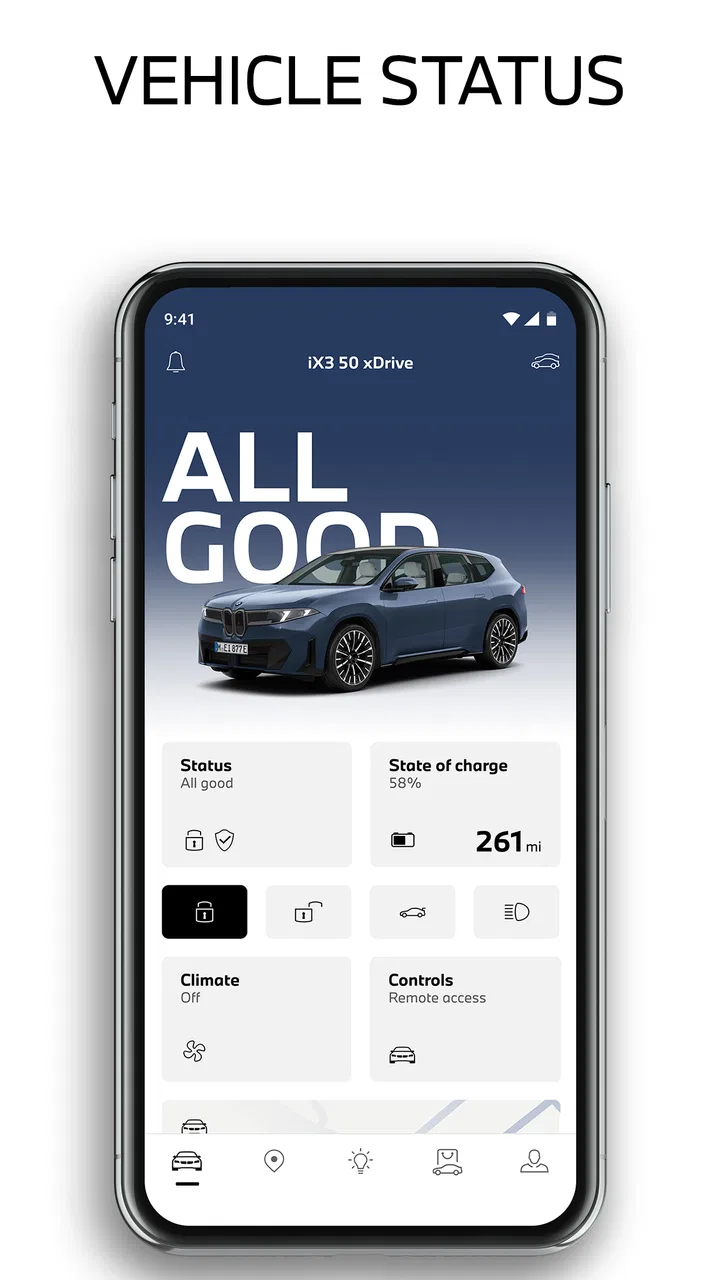
The My BMW app provides a comprehensive suite of features designed to enhance your driving experience. It allows you to remotely lock or unlock your car, check vehicle status, and locate your vehicle. Additionally, the app offers navigation assistance, service scheduling, and integration with BMW's digital services, making it a valuable tool for BMW owners.
02Is the My BMW app compatible with all BMW models?
The My BMW app is compatible with a wide range of BMW models, particularly the newer ones. However, compatibility may vary based on the model year and specific features available in your vehicle. It's advisable to check the app's compatibility with your BMW model on the official website or app store listings before downloading.
03How secure is the My BMW app in terms of data privacy?
The My BMW app prioritizes user data privacy and security. It employs advanced encryption and authentication protocols to safeguard your personal information and vehicle data. BMW continuously updates the app to address security vulnerabilities, ensuring that users have a secure experience. Users are encouraged to keep the app updated and use strong passwords.
04Does the My BMW app require a subscription to access all features?
While the My BMW app offers many features for free, some advanced functionalities may require a subscription or activation of BMW ConnectedDrive services. These services can include real-time traffic information, concierge services, and additional remote functions. Users should review the app's feature list and subscription options to determine what best suits their needs.
05Can I use the My BMW app for multiple vehicles?
Yes, the My BMW app supports multiple vehicles, provided they are registered under the same BMW ID. Users can easily switch between vehicles within the app, allowing them to manage and monitor different cars seamlessly. This feature is particularly useful for families or individuals who own more than one BMW vehicle.
Pros
- Intuitive user interface design.
- Seamless integration with BMW vehicles.
- Real-time vehicle status updates.
- Customizable notifications for maintenance.
- Remote vehicle control features.
Cons
- Limited functionality for older models.
- Occasional connectivity issues.
- Requires strong internet connection.
- Some features locked behind paywall.
- Can drain battery quickly.

My BMW
Gallery